13 October, 2026
7 NDIS Rostering Mistakes That Cost Providers Time (And How to Fix Them)
Feature Update
11 min read
Running an NDIS business takes more than providing quality support. Behind every successful service are carefully planned shifts, reliable support workers, accurate records and clear communication.
But what happens when a worker misses a schedule update, two shifts overlap, or an invoice does not match the hours delivered?
Small rostering problems can quickly turn into bigger operational challenges. They may create extra administrative work, frustrate staff, disrupt participants’ routines and delay billing.
For Australian disability service providers, an effective rostering process is essential for keeping daily operations organised while maintaining a person-centred approach to support.
The good news? Many common rostering problems can be prevented with better planning, consistent processes and the right NDIS rostering software.
In this guide, we explore seven common NDIS rostering mistakes, explain why they happen and share practical ways to avoid them.
Why Is NDIS Rostering So Important?
NDIS rostering involves coordinating support workers, participants, service times, staff availability and individual support requirements. It also connects with other essential activities, including attendance tracking, shift documentation and invoicing.
When these tasks are managed across spreadsheets, paper records, emails and separate applications, information can become difficult to track.
A well-organised rostering process helps providers:
- Schedule suitable support workers for planned shifts.
- Keep staff informed about roster changes.
- Maintain accurate attendance and timesheet records.
- Reduce avoidable scheduling conflicts.
- Keep relevant participant and service information organised.
- Improve visibility across daily operations.
Good rostering is not simply about filling empty time slots. It is about creating a reliable process that supports participants, workers and the wider organisation.
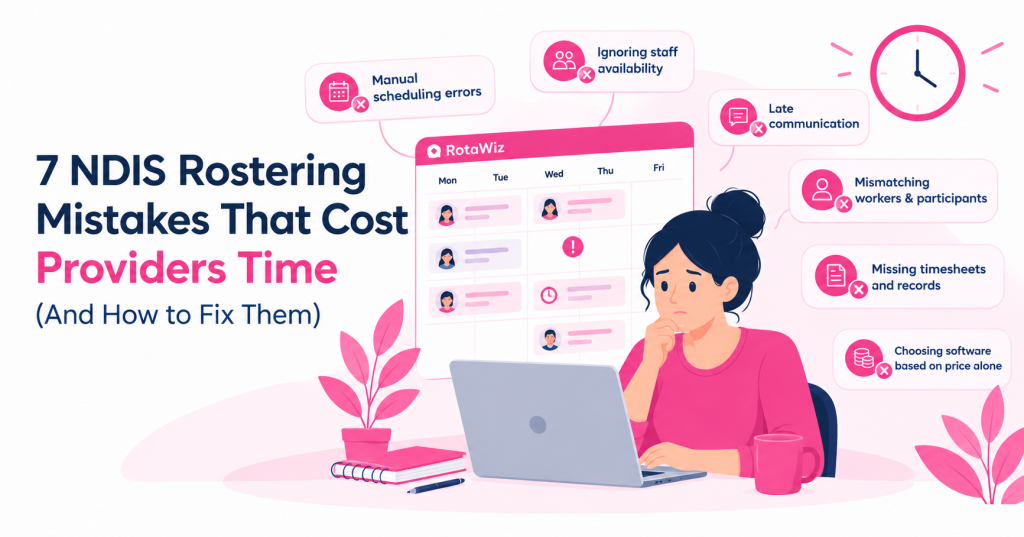
1. Relying on Spreadsheets and Manual Rosters
Spreadsheets can work well when an independent support worker manages only a few appointments. However, as a provider takes on more participants and workers, manual scheduling can become increasingly difficult.
A manager might update a spreadsheet but forget to notify the assigned worker. Another team member may continue using an older version. Over time, these small gaps can create confusion about who is working, where they need to be and when a shift begins.
How to fix it
Establish one central source of truth for rostering. A dedicated scheduling platform can help your team create shifts, review calendars, update schedules and keep relevant information together.
With RotaWiz rostering software, providers can manage recurring shifts, use a central calendar and send shift updates to help keep workers informed.
The aim is not to eliminate every manual task overnight. Instead, start by moving the most frequently updated and error-prone processes into a more consistent system.
2. Ignoring Staff Availability and Shift Conflicts
Assigning a worker to a shift without checking their availability can lead to last-minute cancellations, unnecessary rescheduling and gaps in support.
The problem becomes more complicated when workers support multiple participants, travel between locations or have changing availability throughout the week.
A roster may look complete on screen but still be impractical in the real world.
How to fix it
Check worker availability before confirming assignments. Consider the scheduled time, location, required skills, participant preferences and any relevant qualifications.
Use a consistent process to review potential overlaps before publishing the roster. When a shift changes, make sure the affected people receive the updated information.
RotaWiz includes employee availability tracking and scheduling tools that help providers organise staff assignments and identify potential scheduling issues. Explore its scheduling software to learn more.
Remember that software can support better decisions, but managers should still review individual support requirements and unusual scheduling situations.
3. Communicating Roster Changes Too Late
A participant cancels an appointment. A support worker becomes unavailable. A shift needs to start earlier than planned.
Changes are part of everyday service delivery. The challenge is making sure everyone who needs to know receives the correct update.
Relying only on phone calls, text messages or informal conversations can leave gaps in communication. One person may know about a change while another continues working from the original schedule.
How to fix it
Create a clear process for communicating roster changes.
First, update the official schedule. Next, notify the affected worker and relevant team members. Finally, confirm that the revised arrangement is understood and any required follow-up has been completed.
Where available, use software with mobile access and shift notifications to make updates easier to communicate.
Clear communication is particularly important when changes affect a participant’s established routine. Providers should follow their own service agreements and communication procedures when notifying participants or their representatives.
4. Matching Workers Without Considering Participant Needs
Filling a shift quickly does not automatically mean it has been filled appropriately.
Participants may have specific communication preferences, support requirements, routines or goals. A worker’s availability is only one consideration when deciding who should provide a service.
Overlooking these details can create avoidable difficulties for participants and support workers.
How to fix it
Consider the full picture before assigning a shift. Review relevant participant information, required qualifications, worker experience, availability and documented preferences.
Keep participant records accurate and ensure access is limited to authorised team members. When a new worker joins a shift, make sure they receive the information they need to provide appropriate support.
A centralised system can make relevant records easier to locate, provided the information is current and access is managed appropriately.
The goal is to make rostering decisions that support continuity, respect individual preferences and help workers arrive prepared.
5. Leaving Timesheets Until the End of the Week
Rostering and timesheets are closely connected. A planned shift records what should happen, while attendance and timesheet records help establish what actually happened.
When staff hours are entered or checked days later, missing entries and discrepancies can become harder to investigate. Managers may need to contact workers to confirm attendance, correct records or explain differences before approving timesheets.
These delays can also affect the preparation of invoices and other financial records.
How to fix it
Encourage workers to record attendance and required shift information promptly. Establish a routine for managers to review submitted hours, follow up on missing entries and resolve discrepancies before approving records.
Where suitable, use a platform that connects rostering with time and attendance tracking.
RotaWiz provides timesheet and attendance tools, including GPS-based clock-in features. These capabilities can help providers review recorded hours alongside scheduled shifts.
However, providers should verify records and apply their own approval procedures. Location data and attendance information should also be handled in accordance with applicable privacy obligations and organisational policies.
6. Keeping Shift Notes and Documents in Different Places
Important information can be difficult to retrieve when shift notes, participant documents, incident records and staff information are stored across different systems.
A manager may spend unnecessary time looking for a document or checking whether a required record has been completed.
Disorganised records can also make it harder to maintain consistent internal processes and prepare for audits or reviews.
How to fix it
Create a structured record-keeping process. Define where information belongs, who is responsible for updating it and which team members are authorised to access it.
Make sure workers understand what information they need to record after a shift and when an incident must be escalated through the provider’s established procedures.
Digital document management, shift notes and incident reporting can help bring relevant information together. RotaWiz offers features for managing documentation, shift notes and incident records within its broader platform.
Importantly, using software does not automatically make an organisation compliant. Providers must still follow applicable NDIS requirements, maintain accurate records, protect sensitive information and review their procedures regularly.
7. Choosing Software Based on Price Alone
Cost matters, especially for independent support workers and small NDIS businesses. However, the cheapest option may not be the most suitable if it lacks the functions your team needs.
A basic scheduling tool might handle shifts but require separate applications for timesheets, participant records, documents and invoicing. The additional manual work can make the overall process more complicated than expected.
On the other hand, a large system with features your team never uses may be unnecessarily difficult to manage.
How to fix it
Assess software against your actual business requirements before making a decision.
Ask these questions:
- Can we create and update shifts easily?
- Can we check staff availability and identify scheduling conflicts?
- Can workers access their schedules on mobile devices?
- Can we manage timesheets and attendance records?
- Can we organise participant information and shift documentation?
- Does the pricing suit our current team size?
- Can the platform support our needs as the business grows?
- What security, access-control and support arrangements are available?
RotaWiz brings rostering together with tools for staff and participant management, attendance, timesheets, documentation and invoicing. Its free plan is worth exploring if you are an independent worker or small provider looking to organise core operations without immediately committing to a paid platform.
Review the current plan details and confirm which features and user limits apply to your business before signing up.
A Simple NDIS Rostering Checklist for Providers
Before publishing your next roster, take a few minutes to check the essentials.
- Every planned shift has an assigned worker.
- Worker availability and relevant qualifications have been checked.
- Participant requirements and preferences have been considered.
- Shift times and locations are accurate.
- Potential overlaps and coverage gaps have been reviewed.
- Workers have access to the latest schedule.
- A process is in place for communicating cancellations and changes.
- Attendance, timesheets and required shift notes are reviewed regularly.
- Relevant records are stored securely with appropriate access controls.
Use this checklist as a starting point and adapt it to your organisation’s services, procedures and participant needs.
How NDIS Rostering Software Can Make Daily Operations Easier
The right rostering system can help reduce repetitive administration by bringing important scheduling activities into one place.
Instead of checking multiple spreadsheets, chasing updates and manually comparing shift records, your team can use a more consistent workflow for planning schedules, communicating changes and reviewing completed work.
RotaWiz is designed for Australian NDIS providers who want to manage rostering and related operational tasks through a central platform. Features such as recurring shifts, employee availability tracking, mobile access, timesheets and invoicing can help teams organise their day-to-day work.
Every provider is different, so the best approach is to identify your biggest operational challenges first. Then choose the tools that address those needs without adding unnecessary complexity.
Technology should support your team, not replace professional judgement or the personal relationships at the heart of disability support.
Final Thoughts
Rostering mistakes are not always caused by major failures. Often, they begin with a missed update, an overlooked availability change or a timesheet that was never reviewed.
Over time, these small problems can consume valuable administrative time and make daily operations harder to manage.
By centralising schedules, checking worker availability, communicating changes promptly and maintaining accurate records, NDIS providers can build a more dependable rostering process.
If your current system relies on scattered spreadsheets and repeated manual follow-ups, it may be time to explore a dedicated solution.
Ready to make NDIS rostering easier?
Explore RotaWiz and discover how its rostering and workforce management tools can help you organise shifts, coordinate your team and manage everyday operations more efficiently.
Frequently Asked Questions
1. What is NDIS rostering software?
NDIS rostering software helps disability support providers plan and manage shifts, assign support workers, organise participant schedules and coordinate related administrative tasks. Depending on the platform, it may also include timesheets, attendance tracking, documentation and invoicing.
2. Why is accurate rostering important for NDIS providers?
Accurate rostering helps providers coordinate support workers, maintain service schedules, communicate changes and reduce avoidable scheduling conflicts. It also supports better record-keeping and helps teams review whether planned services were delivered as expected.
3. Can small NDIS providers use rostering software?
Yes. Independent support workers and small providers can use rostering software to organise schedules and records as their workload grows. Before choosing a platform, check its pricing, user limits and included features to ensure they suit your business.
4. How can NDIS rostering software reduce administrative work?
It can bring shift planning, recurring schedules, availability information, attendance records and related workflows into a central system. This can reduce repetitive data entry and make it easier to find current information, although the results depend on how the software is configured and used.
5. What should I look for in NDIS rostering software?
Look for practical scheduling tools, staff availability tracking, mobile access, timesheets, participant information management, reporting, appropriate security controls and transparent pricing. Choose a platform that fits your current requirements and can support your future needs.
6. Is RotaWiz suitable for small NDIS providers?
RotaWiz offers rostering and related operational tools for Australian NDIS providers, including smaller teams. Check the RotaWiz for current plan details and confirm which features and user limits are appropriate for your organisation.


Related Stories for You