27 October, 2026
Everything Your NDIS Team Needs, Starting at $6: Affordable Rostering Software in Australia
Feature Update
9 min read
Introduction: Quality Rostering Doesn’t Have to Cost More
Running an NDIS business involves more than coordinating support workers and participant schedules. Providers must also manage attendance, maintain records, organise timesheets and keep daily operations running smoothly. For small teams, these responsibilities can quickly become difficult to manage without the right tools.
However, investing in software doesn’t have to mean committing to an expensive subscription. With the right platform, providers can organise everyday tasks, reduce repetitive administration and improve visibility across their teams without stretching their budgets.
That’s where affordable NDIS rostering software can make a difference.
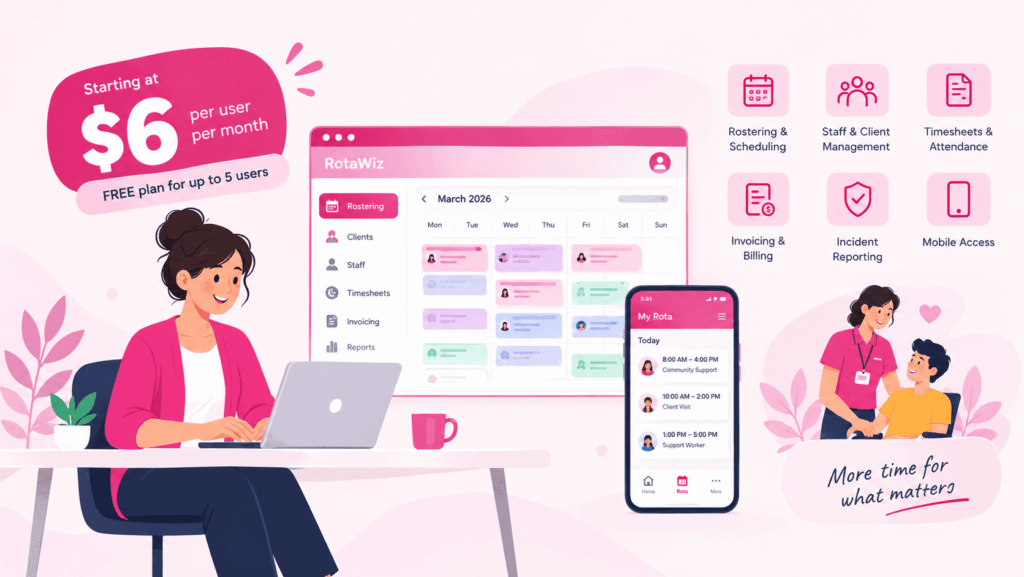
RotaWiz offers a free Startup plan for up to five users, along with an Essential plan starting at A$6 per user per month. As a result, Australian NDIS providers have options to explore depending on their team size, operational requirements and budget.
Why Do NDIS Providers Need Affordable Rostering Software?
Many small providers initially manage their schedules through spreadsheets, calendars, phone calls and messaging applications. Although these methods may work for a small number of shifts, they can become harder to maintain as the business grows.
For example, when a support worker becomes unavailable, a manager may need to find a replacement, update the roster and inform the relevant people. If these tasks are handled across different tools, important information can be missed.
Similarly, manually checking attendance and preparing timesheets can add unnecessary administrative work.
By bringing essential workflows together, rostering software can help providers manage these responsibilities more consistently. Furthermore, a suitable platform can improve schedule visibility and make everyday coordination easier for both managers and support workers.
What Can You Manage with RotaWiz?
RotaWiz combines rostering with other operational capabilities designed for NDIS providers. The exact features available depend on the subscription plan, but the platform offers several useful areas to explore.
1. Organise Staff Shifts More Efficiently
Creating weekly rosters manually can take considerable time, particularly when shifts repeat or schedules change regularly.
RotaWiz offers features such as drag-and-drop rostering, recurring shifts and shift-copying tools. Consequently, managers can organise regular schedules and make routine updates without rebuilding every roster from scratch.
In addition, having a central scheduling system makes it easier to review upcoming shifts and identify changes that need attention.
2. Access Rosters Through Mobile Applications
Support workers often move between participant homes, community locations and other service settings throughout the day. Therefore, convenient access to scheduling information is essential.
RotaWiz provides mobile applications that help users access relevant information away from the office. Depending on the available features and user permissions, mobile access can support day-to-day scheduling and operational activities.
As a result, teams can spend less time relying on printed schedules or searching through messages for the latest information.
3. Keep Timesheets and Attendance Organised
Accurate attendance records are important for reviewing completed shifts and preparing payroll or billing information.
RotaWiz includes timesheet functionality and GPS-based clock-in and clock-out capabilities. These tools can help providers maintain attendance records and review recorded working hours.
Moreover, connecting rostering with timesheet workflows can reduce duplicate data entry and make discrepancies easier to identify. Providers should still review records and confirm that the system matches their operational and record-keeping requirements.
4. Manage Staff and Participant Information
As an NDIS business expands, keeping important information organised becomes increasingly important.
RotaWiz offers staff and client management capabilities, with features such as profiles, case notes and document storage available according to plan. Consequently, providers can explore a more centralised approach to managing relevant operational information.
Appropriate user permissions and privacy controls remain essential, particularly when handling sensitive participant records.
5. Improve Communication Around Shift Changes
Last-minute changes are part of managing a dynamic support workforce. However, communicating those changes through separate phone calls and messages can create confusion.
Supported notifications and shift updates can help keep team members informed about schedule changes. In turn, this can make coordination more consistent and help staff access updated information.
Before selecting a subscription, check which notification features are available and how they can be configured for your organisation.
6. Connect Rostering with Other Business Activities
Scheduling is only one part of running an NDIS service. Providers may also need reporting, invoicing, SIL-related workflows and accounting integrations.
RotaWiz offers additional capabilities across these areas, depending on the selected plan. Therefore, providers looking for a broader operational platform can compare the available subscriptions to identify the functions that best match their needs.
Importantly, not every advanced feature is necessarily included in the entry-level paid plan. Reviewing the current feature comparison helps avoid unexpected costs.
Affordable NDIS Rostering Software Starting at A$6
Software pricing matters, especially for independent support workers and small NDIS businesses. Nevertheless, choosing a platform based only on its lowest advertised price can lead to problems if essential features are missing.
RotaWiz offers two starting points for providers with different requirements.
Startup Plan: Free Forever for Up to Five Users
The RotaWiz Startup plan is available free forever for up to five users. This option gives eligible small teams an opportunity to explore core rostering capabilities without paying a recurring subscription fee.
For a new provider, an independent support worker or a small organisation, starting with a free plan can be a practical way to assess digital rostering before committing to a paid option.
However, it is still important to review the plan’s included features and limitations to ensure it meets your needs.
Essential Plan: Starting at A$6 Per User Per Month
For providers who need a paid subscription, RotaWiz lists its Essential plan starting at A$6 per user per month.
The per-user pricing model makes it easier to estimate the potential subscription cost according to team size. For illustration, the following table shows the monthly cost at the advertised starting rate.
Number of users | Illustrative monthly cost |
5 users | A$30 |
10 users | A$60 |
15 users | A$90 |
20 users | A$120 |
These figures are calculated at A$6 per user per month. They are illustrative estimates rather than quotations; actual pricing depends on the applicable subscription, current terms and any relevant fees.
Want to compare the available options? Visit the RotaWiz pricing page to review current plans and feature inclusions.
Does Affordable Software Mean Compromising on Quality?
Not necessarily. The best software choice depends on how well the platform supports your everyday work, not simply on the size of its subscription fee.
For example, a small provider may primarily need recurring shifts, accessible schedules and timesheet management. In contrast, a larger organisation might require advanced reporting, additional integrations or more complex operational workflows.
Therefore, it is worth identifying your essential requirements before choosing a plan.
Consider the following questions:
- Can managers create and update shifts without unnecessary complexity?
- Can support workers access relevant schedules on mobile devices?
- Are attendance and timesheet records easy to review?
- Does the plan include the features your organisation actually needs?
- Are support options and upgrade costs clearly explained?
- Can the platform accommodate your expected growth?
By answering these questions, you can compare software based on practical value rather than price alone.
How Rostering Software Can Help Small Providers Grow
Affordable rostering software can support more organised operations in several ways.
First, digital scheduling can reduce repetitive manual updates. Instead of maintaining several separate calendars, managers can use a central roster to coordinate shifts.
Next, accessible schedules and supported notifications can help teams stay informed when changes occur. This is particularly useful when workers operate across multiple locations.
Furthermore, connected attendance and timesheet workflows can make it easier to review working hours and identify records that need correction.
Finally, choosing a platform with suitable upgrade options can help a business evaluate additional functionality as its requirements evolve. Although software cannot replace effective management, it can provide a more structured foundation for daily operations.
The results will depend on existing processes, staff adoption and how effectively the platform is implemented.
What Should You Check Before Choosing an NDIS Rostering Platform?
Before subscribing, take time to evaluate the software in the context of your organisation.
Start with your daily workflow. Identify the tasks that consume the most time, such as assigning shifts, following up on attendance or preparing timesheets.
Next, compare the plans. Check user limits, feature availability, subscription terms and the cost of any additional functionality.
Then, test common tasks. If a demonstration or trial is available, create a recurring shift, update a roster and review a timesheet.
Finally, review privacy and support. Make sure the platform provides appropriate access controls and that you understand how participant information is handled. In addition, confirm what assistance is available if your team encounters difficulties.
Taking these steps helps ensure that affordable software is also suitable for your organisation’s operational needs.
Frequently Asked Questions
Q.1 Is RotaWiz free for small NDIS providers?
Yes. RotaWiz lists a Startup plan that is free forever for up to five users. However, you should review the current plan details to confirm its included features and limitations.
Q.2 How much does RotaWiz cost per user?
The published Essential plan starts at A$6 per user per month. Since this is a per-user price, the total subscription cost depends on the number of users and the applicable plan terms.
Q.3 Are all features included in the A$6 plan?
Not necessarily. RotaWiz offers different subscription levels, and some advanced capabilities are plan-specific. Therefore, review the official pricing page before choosing a subscription.
Q.4 Is affordable rostering software suitable for a new NDIS business?
Yes, provided the platform covers the business’s essential scheduling and administrative requirements. A free or lower-cost plan can be a useful starting point while the organisation evaluates its future needs.
Q.5 Can rostering software help reduce administrative work?
It can help by centralising schedules, supporting recurring shifts and connecting rostering with attendance and timesheet workflows. However, the amount of time saved depends on the existing process and how the software is used.
Q.6 Can I upgrade my RotaWiz subscription later?
RotaWiz offers multiple subscription options. To understand the available upgrades, feature differences and current terms, consult the official pricing page or contact the RotaWiz team.
Final Thoughts: Find the Right Balance Between Price and Quality
Managing an NDIS business requires reliable scheduling, clear records and effective coordination. For smaller providers, these needs must also fit within a realistic operating budget.
RotaWiz offers a free Startup plan for up to five users and an Essential plan starting at A$6 per user per month. Consequently, providers can explore options based on their team size, required features and budget.
Rather than choosing software on price alone, focus on the features that make your daily work easier. With the right solution, your team can build more organised rostering processes while preparing for future operational needs.
Ready to explore affordable NDIS rostering software? Visit RotaWiz to learn more, or compare the available plans to find a suitable starting point for your team.