24 November, 2026
NDIS Rostering Checklist: 10 Things to Look for Before Choosing Software in Australia
Feature Update
10 min read
Choosing the right NDIS rostering software is an important decision for any disability support business. Whether you are an independent provider managing a small team or running a growing NDIS organisation, keeping shifts, staff availability, participant information and daily operations organised can take a lot of time.
Many providers start with spreadsheets, phone calls, WhatsApp messages and manual scheduling. These methods may work when the team is small, but as the number of support workers and participants increases, managing everything becomes more complicated.
A staff member may become unavailable, a participant may need a schedule change, or an administrator may need to update several records after a shift. Without a central system, even small changes can create extra administrative work.
This is why choosing the right NDIS rostering software in Australia matters.
But with different software options available, how do you know which one is right for your organisation?
In this guide, we cover 10 important things to look for when comparing NDIS rostering software, so you can choose a solution that makes everyday work easier and supports your business as it grows.
1. Easy Shift Scheduling and Roster Management
Rostering is one of the most important parts of running an NDIS service. Your team needs to know who is working, when shifts are scheduled and which participants require support.
A good NDIS rostering system should make creating and managing shifts straightforward.
Look for features such as:
- Drag-and-drop shift scheduling
- Recurring shift creation
- Copy and edit existing shifts
- Split shift management
- Calendar and schedule views
- Easy shift allocation and updates
For example, if a participant receives support every Monday, Wednesday and Friday, you should be able to create a recurring schedule instead of entering each shift manually.
These features can reduce repetitive work and help administrators manage changing schedules more efficiently.
2. Staff Availability and Leave Management
One of the common challenges for NDIS providers is knowing which support workers are available for upcoming shifts.
A worker might have planned leave, personal commitments or a change in availability. If this information is not updated properly, administrators may spend additional time contacting staff and rearranging schedules.
Your rostering software should allow:
- Staff to update their availability.
- Administrators to view available workers.
- Teams to manage leave requests.
- Managers to identify scheduling gaps.
- Staff availability to be considered during shift allocation.
When availability and rostering work together, it becomes easier to plan schedules and reduce avoidable scheduling conflicts.
3. Mobile Apps for Administrators and Support Workers
NDIS teams do not always work from an office. Support workers regularly travel between participant locations, while administrators may need to manage schedules from different places.
This makes mobile accessibility an important feature.
Before choosing software, check whether it offers mobile applications for both administrators and support workers.
A useful mobile app should allow staff to:
- View upcoming shifts.
- Check shift details and instructions.
- Clock in and clock out.
- Add shift notes.
- Receive shift notifications.
- Update availability.
Administrators should also be able to access important scheduling information, create shifts and make updates while away from their desks.
Mobile access helps keep everyone informed without depending on constant phone calls or messages.
4. Accurate Timesheets and Attendance Tracking
Managing employee working hours manually can become difficult when an organisation handles multiple shifts every day.
Timesheet management is another feature worth checking when comparing NDIS scheduling software.
Look for functionality such as:
- Digital clock-in and clock-out.
- GPS-based attendance verification.
- Automatic timesheet generation.
- Working-hour calculations.
- Timesheet review and approval.
- Travel and expense tracking.
For example, when a support worker completes a shift, their attendance information can help administrators review the recorded working hours.
Having roster and timesheet information in one system can make the process more organised and reduce repetitive data entry.
5. Complete Participant and Staff Profiles
A good rostering platform should provide more than a calendar.
Administrators often need to access participant information, staff details, documents and other important records while managing daily operations.
Switching between multiple spreadsheets and folders can make information difficult to find.
Look for software that provides centralised profiles with relevant information.
Participant profiles may include:
- Personal and contact details.
- Important documents.
- Support information.
- NDIS plan details.
- Goals and milestones.
- Relevant notes and records.
Staff profiles may include:
- Contact information.
- Employment details.
- Qualifications and certifications.
- Availability.
- Important documents.
- Work history.
Having these details organised in one place can make everyday administration easier and help teams access the information they need.
6. Shift Notes and Incident Reporting
Recording what happens during a support shift notes is an important part of maintaining clear service records.
Support workers may need to document completed activities, participant progress, important observations or incidents.
Your NDIS rostering software should make it easy for workers to record relevant information after or during their shifts.
Important features to consider include:
- Digital shift notes.
- Easy note submission through mobile apps.
- Incident reporting.
- Document attachments.
- Access controls for sensitive information.
- Clear records for administrators to review.
For example, a support worker should be able to complete a shift and submit their notes without having to return to the office or manage separate paper documents.
A centralised record system can also help administrators review submitted information more efficiently.
7. Client Onboarding and Document Management
Bringing a new participant into your service involves collecting and organising important information.
If your organisation manages onboarding through emails, paper forms and separate folders, the process can become difficult to track.
When evaluating software, check whether it supports:
- Participant information collection.
- Digital onboarding forms.
- Document uploads and storage.
- Organised participant profiles.
- Important record management.
- Easy access for authorised team members.
A structured onboarding process helps your team collect the information it needs and keep participant records organised from the beginning.
8. Reporting, Invoicing and Accounting Integrations
Rostering is connected to several other business activities, including timesheets, expenses, invoicing and financial administration.
If your organisation uses separate systems for each activity, information may need to be entered more than once.
Look for software that supports:
- Timesheet reporting.
- Staff activity reports.
- Shift and service records.
- Invoice generation.
- Expense tracking.
- Accounting integrations.
Integrations with platforms such as Xero and QuickBooks can also help connect relevant operational and accounting workflows.
Before selecting a platform, check which integrations are available and whether they match your organisation’s existing processes.
9. Transparent Pricing That Fits Your Business
Software pricing is an important consideration, especially for independent support workers and small NDIS providers.
Some platforms charge based on the number of users, while others offer different feature packages or additional charges.
Before making a decision, check:
- Is there a free plan?
- How many users are included?
- What features are available?
- Is there a setup fee?
- Are mobile apps included?
- What happens when your team grows?
- Are additional features charged separately?
You should be able to understand the pricing before committing to a platform.
For smaller organisations, a free starting option can be particularly useful because it allows the team to explore the software without immediately taking on another monthly expense.
10. Reliable Customer Support and Room to Grow
Your software should support your organisation as it develops.
A system that works for five support workers today should also offer a suitable upgrade path if your team grows to 15, 30 or more employees.
However, features are only one part of the decision. Customer support matters too.
Check whether the software provider offers:
- Accessible customer support.
- Helpful onboarding resources.
- User guides and tutorials.
- Assistance with technical questions.
- Regular product improvements.
- Flexible plans for growing organisations.
Having access to helpful support can make it easier for your team to understand the platform and use its features confidently.
Why NDIS Providers Should Consider RotaWiz
Finding software that combines rostering, staff management, participant information and daily administrative tools can make a real difference to how an NDIS organisation operates.
RotaWiz is an NDIS rostering and workforce management platform designed for Australian providers.
Instead of managing different operational activities across disconnected tools, RotaWiz brings several important functions together in one platform.
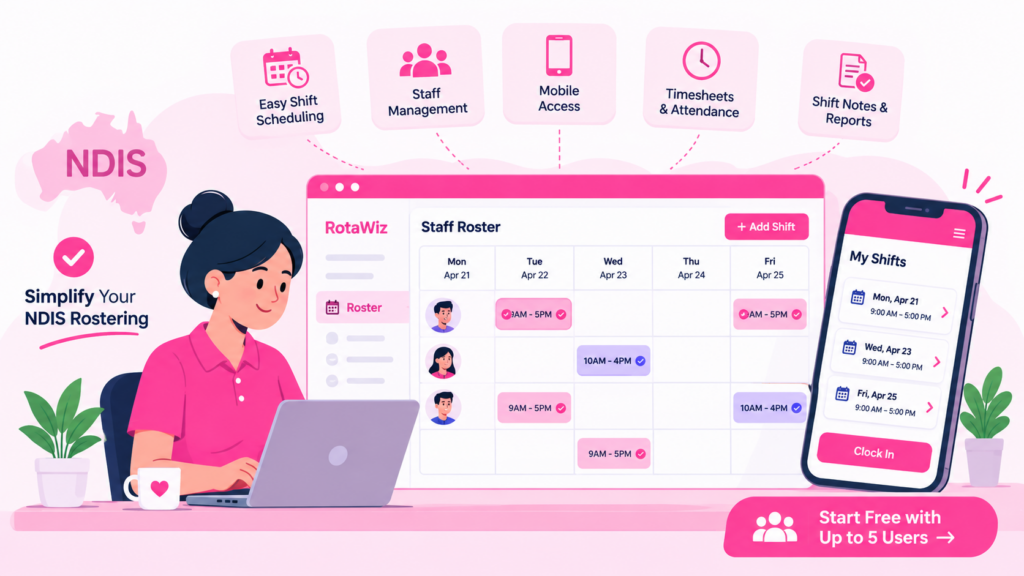
Here is what your team can manage with RotaWiz:
Smarter Rostering: Create, copy, split and schedule recurring shifts using an organised scheduling system.
Staff Availability: Manage staff availability, leave and scheduling requirements.
Mobile Applications: Give administrators and support workers mobile access to relevant schedules and work information.
GPS Timesheets: Record attendance through GPS-powered clock-in and clock-out functionality.
Shift Notes and Incident Reporting: Allow support workers to record important shift information and report incidents.
Participant and Staff Management: Maintain organised profiles, documents and important information.
SIL Rostering: Manage supported independent living schedules and related operational requirements.
Invoicing and Integrations: Support billing workflows and connect with accounting platforms such as Xero and QuickBooks.
Start Using RotaWiz Without Expensive Software Costs
You don’t need a large budget to start organising your NDIS operations.
RotaWiz offers a Startup plan at $0 for up to 5 users, free forever.
If your organisation needs more users, the Essential plan starts at A$6 per user per month.
You can explore the platform, check its features and choose a plan that suits your organisation.
No need to commit to an expensive system just to get started.
Ready to make your daily rostering easier?
Create Your Free RotaWiz Account
Frequently Asked Questions About NDIS Rostering Software
1. What is NDIS rostering software?
NDIS rostering software is a digital platform that helps disability support providers create staff schedules, allocate shifts, manage availability, track attendance and organise important service information.
2. Why do NDIS providers need rostering software?
It helps providers manage staff schedules, reduce manual administration, organise participant information and keep their teams updated about shift changes.
3. What features should I look for in NDIS rostering software?
Look for shift scheduling, recurring shifts, staff availability, mobile apps, timesheets, participant profiles, shift notes, incident reporting and invoicing features.
4. Is there free NDIS rostering software in Australia?
Yes. RotaWiz offers a free Startup plan for up to five users, with no time limit. Providers can explore its core rostering and operational features without paying a monthly subscription.
5. Can support workers manage their shifts through a mobile app?
Yes. RotaWiz provides mobile access for support workers, allowing them to view shifts, access relevant information, clock in and out, and submit shift notes.
6. How much does NDIS rostering software cost?
Pricing depends on the software provider, features and number of users. RotaWiz offers a free plan for up to five users, while its Essential plan starts at A$6 per user per month.
7. Can small NDIS providers use RotaWiz?
Yes. RotaWiz is suitable for small and growing NDIS organisations. Its free Startup plan allows smaller teams to get started without an upfront software subscription.
Final Thoughts
Choosing the right NDIS rostering software is about finding a system that makes everyday work easier, not simply adding another tool to your business.
From managing staff availability and participant schedules to recording timesheets and organising important documents, the right platform can help bring your daily operations together.
Before choosing software, consider your current team size, operational requirements, budget and future plans.
If you are looking for an affordable way to organise your NDIS operations, RotaWiz is worth exploring.
Start free with up to five users and see how RotaWiz can help your team manage rostering more efficiently.


Related Stories for You