A centralised system with automated expiry alerts means you’ll never have a lapsed credential slip through again.
2. Roster Smarter – Not Just Faster
Most providers waste hours every week rebuilding the same roster. That time doesn’t have to be spent that way.
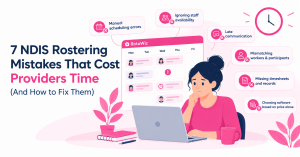
The most common rostering mistakes:
- Assigning whoever’s available – without checking qualifications against participant needs
- Not accounting for travel time between community shifts
- Over-relying on a small group of key workers
- Sending schedule changes via WhatsApp with no paper trail
What smart rostering looks like instead:
- Recurring shift patterns for stable participants – set once, runs weekly
- Conflict detection that flags credential mismatches before the shift is confirmed
- Travel time buffers built into community support schedules
- A trained pool of relief workers ready to fill same-day gaps
The goal isn’t a perfect roster on Monday. It’s a system that handles the inevitable changes on Thursday without sending your coordinator into a panic.
3. Give Support Workers a Proper Mobile App
Your support workers are never at a desk. So why are you expecting them to use desktop tools?
When workers have to wait until they’re home to log shift notes, timesheets are wrong. When schedule changes come through a group chat, people miss them. When clock-in is manual, attendance records don’t hold up in an audit.
A purpose-built support worker mobile app should let workers:
- View their upcoming shifts instantly
- Clock in with GPS verification at the participant’s location
- Log shift notes and case documentation on the spot
- Receive real-time notifications for any schedule changes
- Flag incidents or concerns directly to their coordinator
The result? Documentation builds itself in real time. Timesheets are accurate. Attendance is verified. And your admin team isn’t chasing up paperwork on Friday afternoon.
Worth knowing: If your support workers find the app confusing or clunky, they won’t use it. The quality of the mobile experience matters as much as the features. A tool your team avoids is a liability, not an asset.
4. Ditch Group Chats for Shift Communication
WhatsApp groups for shift changes are one of the most common compliance risks in the disability sector. There’s no reliable delivery confirmation. There’s no audit trail. And it’s almost impossible to prove a worker received a change request.
What structured communication through your NDIS platform gives you:
- Every schedule change logged, timestamped, and sent automatically
- Confirmation tracking – see who has acknowledged their shift
- No missed notifications for casuals spread across multiple sites
- A complete communication record if anything is ever disputed
This is especially critical for casual and part-time workers. The more dispersed your workforce, the higher the risk of communication gaps – and the more you need a system, not a chat thread.
5. Verify Attendance – Don’t Just Trust Timesheets
Manually submitted timesheets are one of the biggest sources of billing errors in NDIS service delivery.
If the hours on an invoice don’t match verified service delivery records, claims get rejected. If patterns of inaccuracy appear across multiple workers, the NDIS Commission takes notice.
Geo-fenced clock-in solves this:
When a support worker clocks in using the mobile app, their GPS location is verified against the service address. The timestamp is automatically recorded. That record feeds directly into their timesheet – and from there, into your billing workflow.
What used to take your admin team hours to reconcile each week can be reviewed and approved in minutes.
6. Build a Retention Strategy – It’s Cheaper Than Recruiting
Replacing a trained NDIS support worker costs more than most providers realise. Recruitment, onboarding, participant relationship building, and the productivity dip while a new worker gets up to speed all add up quickly.
What actually drives support worker retention:
- Rosters published at least one week in advance
- Instant notification of changes – through the platform, not a phone call at 7am
- Visibility of their own schedule, leave balance, and timesheet
- Clear shift notes and participant information accessible before every shift
- A sense that the organisation is well-run and professional
That last point matters more than most managers realise. Workers who feel respected and equipped stay longer. A professional, easy-to-use system is one of the most visible signals you can send that your organisation values their time.
Stay Audit-Ready Every Single Day
NDIS audits don’t always give much notice. Providers who manage their workforce through manual systems consistently find audit preparation stressful, time-consuming, and risky.
Purpose-built NDIS software maintains a continuous audit trail as a natural by-product of daily operations. Every shift, credential, incident, and billing record is stored, timestamped, and retrievable in seconds – not hours.
When an audit request arrives, you should be able to produce:
- Full service delivery records for any date range
- Worker credential status for every staff member
- Incident logs with response and follow-up records
- Verified attendance records with GPS confirmation
- Complete participant documentation and care plan history
If you can’t do that today, it’s worth fixing before the request arrives.
Frequently Asked Questions
Q: What qualifications do NDIS support workers need in Australia?
At minimum, NDIS workers need a current NDIS Worker Screening clearance. Depending on the role, they may also need first aid and CPR certification, manual handling training, medication administration credentials, and a Working With Children Check for relevant participants.
Q: How do I handle last-minute support worker cancellations?
Maintain a trained relief pool in your rostering system with current credentials and up-to-date availability. When a cancellation comes in, you can identify qualified staff and send shift notifications directly – instead of working through a contact list by phone.
Q: Does NDIS software actually help with worker retention?
Yes – indirectly but meaningfully. Workers with clear schedules, easy mobile tools, and less daily friction stay longer. A professional system also signals that your organisation is well-run, which matters when you’re competing for staff in a tight labour market.
Q: Can I manage casual workers the same way as permanent staff?
Yes. Casuals need the same credential tracking, clear communication, and verified attendance records as permanent staff. A centralised platform treats casual and permanent workers consistently – which protects both the worker and your compliance standing.
Manage Your Support Workers With RotaWiz – Free
RotaWiz brings worker profiles, rostering, mobile clock-in, compliance tracking, and NDIS billing into one connected platform. It’s free for life for small providers – no credit card, no lock-in.
Start Free Today at rotawiz.com.au