If you run an NDIS service in Sydney -whether you’re based in the CBD, out west around Parramatta and Blacktown, or covering the Eastern Suburbs and Northern Beaches -you already know the real challenge isn’t delivering good care. It’s keeping the paperwork behind it under control.
Rosters built in one spreadsheet. Timesheets chased over text. Invoices reconciled by hand at the end of the month. Multiply that across a growing team of support workers and a caseload spread across NSW, and admin quietly eats hours that should go to participants.
This is why more Sydney NDIS providers are switching to purpose-built NDIS software instead of stitching together generic scheduling apps, spreadsheets and separate invoicing tools. In this guide, we’ll look at what NDIS software actually does, what to check for before choosing one, and how local providers are using platforms like RotaWiz’s NDIS software for Sydney to run rostering, plan management and billing from one place.
Why Sydney NDIS Providers Need Software Built for the Job
Sydney is a big, spread-out market for disability support. A single provider might have support workers driving between the Inner West and the Sutherland Shire in the same week, casual staff picking up shifts at short notice, and participants whose NDIS plans need to be tracked down to the dollar.
Generic workforce tools weren’t built for that. They don’t understand SCHADS Award interpretation, they don’t handle NDIS plan budgets, and they don’t generate NDIS-ready invoices. That gap is exactly why “NDIS software” has become its own category -and why the providers ranking well and referred most often in Sydney are the ones using systems designed specifically around the NDIS Quality and Safeguards Commission’s requirements.
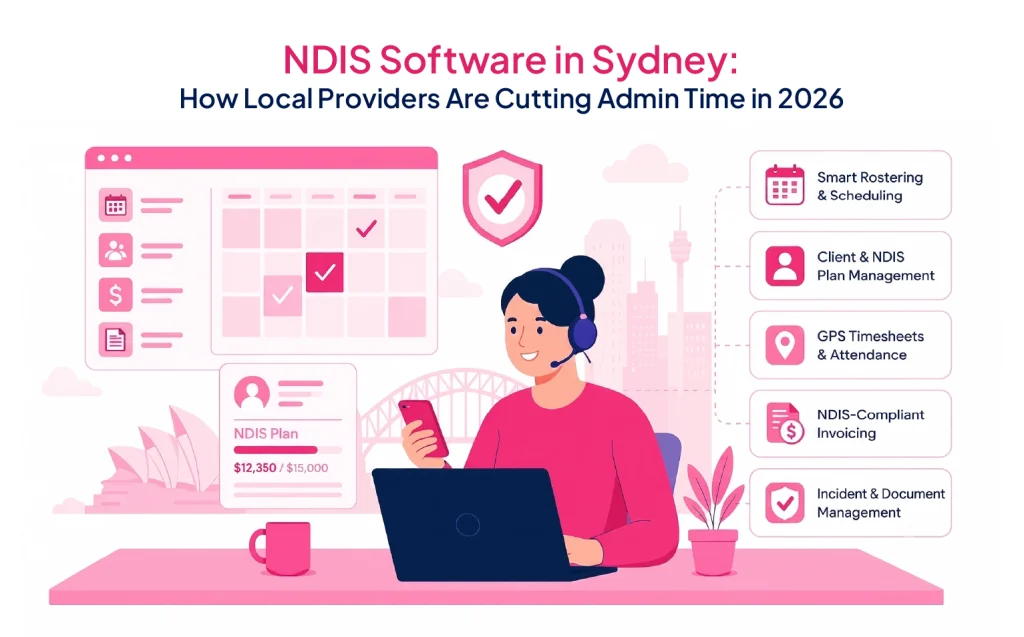
Purpose-built platforms typically combine:
- Rostering and scheduling -drag-and-drop shifts, recurring rosters and clash detection so double-bookings don’t slip through.
- Client and NDIS plan management -tracking participant goals and funding periods in real time, not in a separate spreadsheet.
- Timesheets and attendance -often GPS-verified, so hours worked match hours billed.
- NDIS-compliant invoicing -claims and billing that reconcile against the plan, and sync to accounting tools like Xero, MYOB or QuickBooks.
- Incident and document management -the kind of audit trail the NDIS Commission expects to see.
When these sit in one system rather than four, the admin load drops noticeably -providers using all-in-one platforms commonly report cutting hours of manual work each week, simply because staff aren’t re-entering the same shift or client data in multiple tools.
What to Look For in NDIS Software (Sydney-Specific Checklist)
Not all NDIS software is built the same way, and the differences matter once you’re relying on it daily. Before signing up, it’s worth checking a provider against a short list:
- Does it actually cover NDIS compliance, not just rostering?
Plenty of scheduling apps are labelled “for care providers” but stop at shift management. Ask whether SCHADS Award interpretation, NDIS plan tracking and incident logging are built in, or whether you’ll still need a separate compliance process.
- Is pricing predictable as your team grows?
Sydney providers range from sole traders and small SIL operators to larger multi-service organisations. A system that’s free for a handful of users and scales at a flat per-user rate (rather than charging per module) is easier to budget against as you add staff.
- Is your data hosted in Australia?
For NDIS participant data, Australian hosting isn’t a nice-to-have -many providers treat it as a baseline requirement, and it makes support conversations easier when the vendor is in the same time zone.
- Does it support the services you actually deliver?
If you run Supported Independent Living (SIL), allied health scheduling, or aged care alongside core NDIS supports, check the software handles all of it -property and capacity tracking for SIL, appointment scheduling for allied health -rather than forcing you onto a second tool for anything outside basic rostering.
- Can your frontline staff use it from their phone?
Support workers are rarely at a desk. Mobile apps for carers to view shifts and log notes, and for participants or families to see updates, matter as much as the admin-side dashboard.
How RotaWiz Fits Sydney NDIS Providers
RotaWiz is Australian-built software designed around exactly this list. For Sydney providers, it brings rostering, client and NDIS plan management, GPS timesheets, incident reporting and invoicing into a single platform, so teams aren’t juggling a scheduler, a spreadsheet and a billing tool separately.
A few things that matter locally:
- Free to start -the Startup plan is free forever for up to 5 users, with no credit card required, which suits small and newly registered Sydney providers testing the waters.
- Predictable scaling -once a team grows past 5 users, plans move to $6 per user per month (or $10/user for full NDIS plan management and SCHADS interpretation), with no setup fees.
- Built for NSW’s spread -recurring shifts, GPS-verified timesheets and real-time updates to carers in the field are designed for providers covering ground from the CBD out to Western Sydney.
- More than rostering -SIL property and capacity tracking, allied health scheduling and aged care management sit in the same system as core NDIS supports.
- Local support -Australian-hosted data with WhatsApp and email support, rather than an overseas help desk on a different clock.
You can see the full breakdown of features and pricing on the RotaWiz NDIS software Sydney page.
A Realistic Way to Evaluate Your Options
If you’re comparing NDIS software providers in Sydney, the most useful test isn’t a feature checklist -it’s a same-day trial. Because RotaWiz’s free tier doesn’t require a card or a sales call, you can register, load a handful of staff and participants, build a real roster, and see whether the workflow actually fits how your team operates before committing to anything paid. That’s a more honest evaluation than a demo video, and it costs nothing to try.
Frequently Asked Questions
Q.1 Is there free NDIS software available in Sydney?
Yes. RotaWiz offers a free-forever plan for up to 5 users, with no credit card needed. It includes rostering, client management, GPS timesheets and mobile apps, and only becomes paid once a provider’s team grows past 5 users.
Q.2 What’s the difference between rostering software and full NDIS software?
Rostering software just manages shifts. Full NDIS software also covers client and plan management, NDIS-compliant invoicing, incident reporting and SCHADS Award interpretation -the compliance layer specific to disability services in Australia.
Q.3 How much does NDIS software typically cost in Sydney?
Pricing varies by vendor, but a fair benchmark is a genuine free tier for small teams, then a flat per-user rate as you scale. RotaWiz, for example, starts free for 5 users and moves to $6–$10 per user per month with no setup fees.
Q.4 Can one platform handle SIL, allied health and aged care as well as core NDIS supports?
It can, if the software is built for it. RotaWiz supports SIL property and capacity management, allied health scheduling, and aged care rostering alongside standard NDIS supports, so mixed-service providers aren’t running separate systems for each.
Q.5 Does NDIS software need to be Australian-hosted?
It’s strongly recommended. Given the sensitivity of participant data and NDIS Commission expectations, Australian hosting and local support make compliance and day-to-day troubleshooting considerably simpler.
Q.6 How quickly can a Sydney provider get started with new NDIS software?
With platforms offering a no-card free tier, setup can happen the same day -register, add staff and participants, and build the first roster without a sales call or onboarding project.
Ready to see it for yourself? Start free for up to 5 users -no credit card required.