
18 August, 2026
Rostering Software: A Complete Guide for Australian NDIS Providers
Feature Update
10 min read
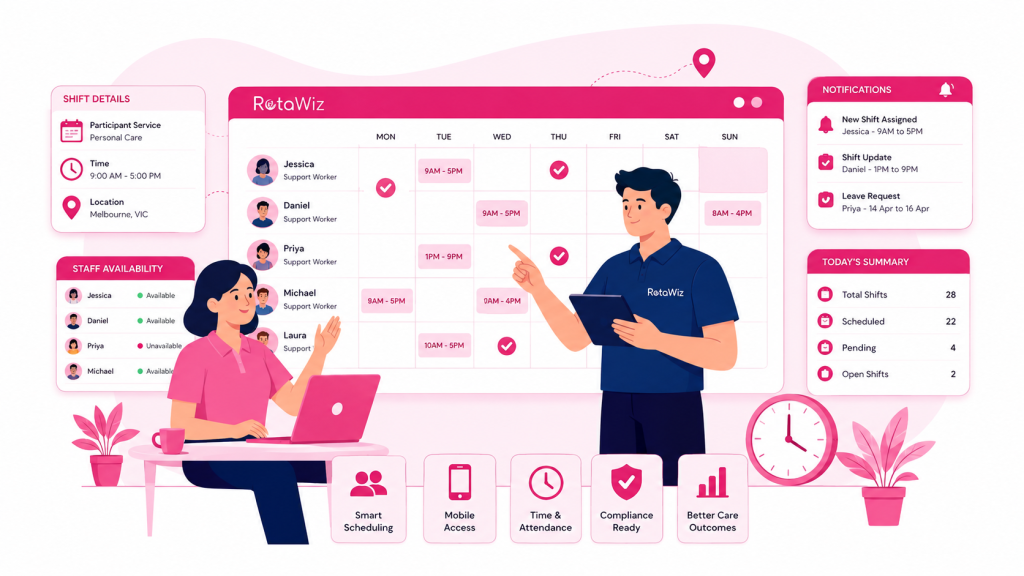
Managing staff schedules in an NDIS organisation is much more than putting names and times into a calendar. Providers need to coordinate support workers, participant requirements, staff availability, recurring services, leave, shift changes, timesheets and service records while keeping day-to-day operations organised.
For a growing NDIS provider, spreadsheets, paper rosters and multiple disconnected systems can quickly become difficult to manage.
This is where rostering software can make a significant difference.
Modern rostering systems help providers create schedules, manage staff availability, communicate shift changes, track attendance and connect rostering with other operational processes. For Australian disability support providers, the right platform can also help create a more consistent and transparent workflow across administrators, support workers and participants.
In this guide, we explain what rostering software is, how it works, the key features to look for and how NDIS providers can choose a solution that fits their organisation.
What Is Rostering Software?
Rostering software is a digital system designed to help organisations create, manage and monitor employee schedules.
Instead of relying on spreadsheets or manually updating calendars, managers can use one central platform to:
- Create and assign shifts
- Check staff availability
- Manage recurring shifts
- Track leave and unavailability
- Notify staff about schedule changes
- Monitor attendance and timesheets
- Manage shift notes and records
- Reduce scheduling conflicts
- Review roster information in real time
For NDIS providers, rostering software can be particularly useful because support services often involve recurring shifts, changing participant requirements, multiple workers and different locations.
A well-designed system connects the roster with the wider service-delivery workflow rather than treating scheduling as an isolated administrative task.
Why Do NDIS Providers Need Rostering Software?
NDIS providers often manage complex schedules across participants, support workers and different service locations.
A small provider may initially manage this through spreadsheets. However, as the number of participants and workers increases, manual rostering becomes harder to maintain.
A single schedule change may require updates across several documents, messages and systems. This creates opportunities for mistakes.
Rostering software helps centralise these processes.
1. Reduce Manual Administration
Creating rosters manually can consume significant administrative time.
With digital rostering, managers can create recurring shifts, copy previous schedules and make changes from a central calendar.
This reduces repetitive data entry and gives administrators more time to focus on service delivery and team coordination.
2. Improve Staff Availability Management
Staff availability can change because of leave, personal commitments, shift preferences or other work responsibilities.
A rostering system can provide a central view of availability so managers can make better scheduling decisions before assigning a shift.
RotaWiz, for example, includes employee availability tracking that helps administrators identify unavailable carers before assigning shifts.
3. Reduce Scheduling Conflicts
Double-booking a worker or assigning a shift when someone is unavailable can create unnecessary disruption.
Digital scheduling tools can help managers identify conflicts and maintain a clearer overview of the roster.
This is especially valuable when a provider manages multiple participants and support workers at the same time.
4. Keep Everyone Updated
Rosters can change at short notice.
A worker may become unavailable, a participant’s service may change, or a shift may need to be reassigned.
Instead of relying entirely on phone calls, emails or separate messaging systems, rostering software can provide centralised updates and notifications.
RotaWiz supports real-time shift updates and mobile notifications for carers and staff.
Key Features to Look for in Rostering Software
Not every rostering platform provides the same capabilities. Before choosing a system, NDIS providers should evaluate whether it supports the practical requirements of their organisation.
1. Employee Rostering and Scheduling
The foundation of any rostering system is an easy-to-use scheduling interface.
Look for features such as:
- Calendar-based scheduling
- Drag-and-drop roster management
- Recurring shifts
- Shift copying
- Shift types
- Real-time updates
- Conflict management
These features make it easier to create and maintain accurate schedules.
2. Employee Availability Tracking
Employee availability management should be connected directly to rostering.
Staff should be able to communicate their availability or unavailability, while administrators should have a clear view before assigning shifts.
This can help reduce last-minute roster changes and improve workforce planning.
3. Leave Management
Leave is a normal part of workforce management.
A rostering platform should make it simple to submit, review and track leave requests while keeping the roster updated.
This helps managers understand where coverage gaps may occur before they become urgent problems.
4. Mobile Access
Support workers are rarely sitting at a desk throughout their working day.
Mobile access allows staff to view their schedules, receive updates, clock in or out and record relevant shift information while working in the field.
RotaWiz provides mobile access for administrators and carers, including roster viewing, clock-in/out and shift notes.
5. Timesheets and Attendance Tracking
A strong rostering platform should connect scheduled shifts with actual attendance.
Features such as clock-in/out, timesheets and approval workflows can help organisations maintain more accurate records.
RotaWiz also provides GPS-supported clock-in/out and timesheet management.
6. Shift Notes and Documentation
For disability support services, the roster is only one part of the operational workflow.
Managers and carers may also need to maintain shift notes, participant information, documents and other records.
Connecting these workflows can reduce the need to move information between multiple systems.
7. Integrations
Rostering software becomes more valuable when it connects with other business systems.
For example, integrations with accounting platforms can reduce duplicate data entry between workforce management and finance processes.
RotaWiz currently supports integrations including Xero and QuickBooks on its rostering platform.
Rostering Software vs. Spreadsheets
Spreadsheets can work for a very small team with a simple schedule. But they become increasingly difficult to manage as an organisation grows.
| Spreadsheets | Rostering Software |
|---|---|
| Manual schedule updates | Centralised digital scheduling |
| Higher risk of version conflicts | One central roster |
| Limited automation | Recurring and copied shifts |
| Manual availability checking | Integrated availability management |
| Separate communication | Automated notifications |
| Manual timesheet processes | Connected timesheets |
| Difficult to scale | Designed for growing teams |
| Limited mobile functionality | Mobile access |
The goal is not simply to replace a spreadsheet.
The bigger benefit is creating a connected workflow where scheduling, availability, attendance and operational information work together.
How Rostering Software Can Help NDIS Service Delivery
Good rostering directly affects the reliability of support services.
When the right worker is scheduled at the right time, providers can reduce avoidable disruptions and create more predictable service delivery.
A digital roster can help teams:
- Maintain consistent recurring services
- Match workers with appropriate shifts
- Identify availability before scheduling
- Respond quickly to changes
- Reduce missed or conflicting shifts
- Improve communication between administrators and carers
- Keep scheduling information organised
RotaWiz is designed specifically around the operational needs of NDIS providers, including scheduling, participant management, availability, timesheets, funding workflows and service reporting.
How to Choose the Best Rostering Software in Australia
The “best” rostering software depends on the organisation using it.
An NDIS provider should consider more than the number of features available.
Consider Your Team Size
A system suitable for a five-person team may not be suitable for a provider managing hundreds of workers.
Choose software that can grow with your organisation.
Consider Your Service Model
Think about the types of services you provide.
Do you manage standard support shifts, SIL services, allied health, aged care or multiple service types?
The software should support your actual workflows rather than forcing your team into a rigid process.
Check Mobile Functionality
If your support workers work primarily in the field, mobile access is essential.
Check whether workers can view shifts, receive notifications, record attendance and access relevant information from their phones.
Review Integrations
Consider the systems your organisation already uses.
Accounting, calendar and other business integrations can reduce duplicate work and improve operational consistency.
Evaluate Ease of Use
A platform can have many features but still be difficult to use.
Look for a system that administrators and support workers can understand without unnecessary complexity.
Check Security and Data Handling
NDIS providers manage sensitive business and participant information.
Before selecting a platform, review its security controls, access permissions, data handling practices and relevant policies.
What Makes RotaWiz Different?
RotaWiz is an Australian-focused platform designed to bring rostering and wider NDIS operations together.
Instead of treating rostering as a standalone calendar, RotaWiz connects scheduling with employee availability, participant management, timesheets, attendance, invoicing and other operational workflows.
Its feature set includes recurring and copied shifts, calendar scheduling, real-time notifications, mobile apps, timesheets, client and carer profiles, leave management and integrations.
RotaWiz also supports broader NDIS workflows beyond rostering, including participant management, funding workflows, service reporting, mobile access and accounting integration.
For smaller providers, this approach can help avoid managing several disconnected tools for everyday operations.
Is Rostering Software Worth It for a Small NDIS Provider?
Yes, particularly when administrative work starts taking time away from service delivery and business growth.
A small provider may not need an enterprise workforce-management platform.
Instead, look for software that provides the essential capabilities without unnecessary complexity.
Important starting features include:
- Staff scheduling
- Employee availability
- Recurring shifts
- Leave management
- Mobile access
- Notifications
- Timesheets
- Attendance tracking
- Participant information
- Reporting
As the organisation grows, additional capabilities can become increasingly valuable.
The Future of Rostering for NDIS Providers
Rostering is becoming more connected to the wider operational systems used by care and support organisations.
The future of rostering is not simply about creating a timetable.
It is about connecting people, schedules, attendance, participant needs, documentation and business processes in one reliable workflow.
For NDIS providers, this means selecting software that can support today’s scheduling requirements while also adapting to future operational growth.
The right system should make everyday work easier for administrators and support workers while helping organisations maintain better visibility across their services.
Final Thoughts
Rostering is one of the most important operational processes for an NDIS provider.
When schedules are managed manually, small changes can create a chain of administrative tasks. As teams grow, these challenges can become harder to control.
Rostering software in Australia gives providers a more structured way to manage shifts, employee availability, leave, notifications, attendance and timesheets.
For NDIS organisations, the strongest solution is one that goes beyond basic employee scheduling and connects rostering with participant management and wider service-delivery workflows.
RotaWiz brings these capabilities together in one platform designed for Australian NDIS providers.
If your organisation is still managing rosters through spreadsheets or disconnected tools, moving to dedicated NDIS rostering software can be a practical step toward simpler scheduling, better visibility and more efficient day-to-day operations.
Frequently Asked Questions
Q.1 What is NDIS rostering software?
NDIS rostering software is a digital platform that helps disability support providers create and manage staff schedules, employee availability, recurring shifts, leave, attendance and related service-delivery information.
Q.2 What is the best rostering software for NDIS providers?
The best rostering software depends on the provider’s team size, services, workflows, budget and required integrations. NDIS providers should look for software that combines scheduling with availability, timesheets, participant management and mobile access.
Q.3 Can rostering software replace spreadsheets?
For many growing organisations, yes. Dedicated rostering software provides centralised scheduling, automated workflows, notifications and better visibility than manually maintained spreadsheets.
Q.4 Does rostering software help with staff availability?
Yes. Modern systems can connect employee availability with scheduling so administrators can see who is available before assigning shifts.
Q.5 Can NDIS rostering software manage recurring shifts?
Many modern rostering platforms support recurring shifts. RotaWiz allows providers to create repeating shift patterns and make changes without rebuilding the entire roster.
Q.6 Is RotaWiz suitable for small NDIS providers?
RotaWiz is designed to support Australian NDIS providers, including smaller organisations, with rostering and broader operational workflows such as participant management, timesheets and invoicing.


Related Stories for You


How Small NDIS Providers Can Reduce Admin and Manage Growth
September 15, 2026